> ## Documentation Index
> Fetch the complete documentation index at: https://docs.greed.best/llms.txt
> Use this file to discover all available pages before exploring further.
# VoiceMaster
> Custom VoiceMaster configuration documentation for Premium guilds.
With greed Premium you get the additional option to setup custom interfaces as well as adding more than one channel/category, this guide will take you over how to set it up.
## Setting up the custom interface
The VoiceMaster interface uses the normal script system which you can read more about [here](/resources/scripting). For this example, we will be using our own script.
```bash Syntax theme={null}
,voicemaster interface (script)
```
```bash Example theme={null}
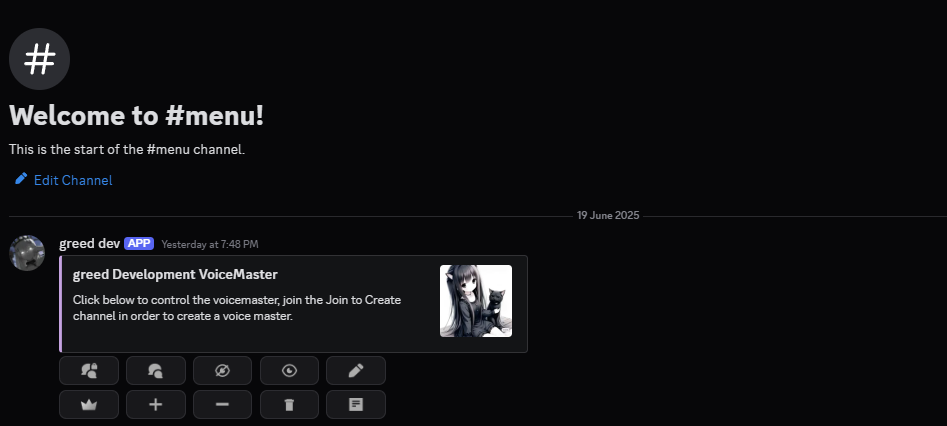
,voicemaster interface {embed}{color: #c5a3e0}$v{title: {guild.name} VoiceMaster}$v{description: Click below to control the voicemaster, join the Join to Create channel in order to create a voice master.}$v{thumbnail: {guild.icon}}
```
After running the above command, you will get the following interface:
 To help guide your members on what buttons do, you can use the following variables which will automatically replace to the VoiceMaster icons:
`{lock}`, `{unlock}`, `{hide}`, `{reveal}`, `{rename}`, `{claim}`, `{increase}`, `{decrease}`, `{delete}`, `{information}`
With premium you can have up to 3 Join to Create voice channels, each of them can even create the channel in a specific set category, this is how you set it up:
```bash Syntax theme={null}
,voicemaster add (name)
```
```bash Example theme={null}
,voicemaster add j2c
```
After running the above, your voice channels will look like this:
To help guide your members on what buttons do, you can use the following variables which will automatically replace to the VoiceMaster icons:
`{lock}`, `{unlock}`, `{hide}`, `{reveal}`, `{rename}`, `{claim}`, `{increase}`, `{decrease}`, `{delete}`, `{information}`
With premium you can have up to 3 Join to Create voice channels, each of them can even create the channel in a specific set category, this is how you set it up:
```bash Syntax theme={null}
,voicemaster add (name)
```
```bash Example theme={null}
,voicemaster add j2c
```
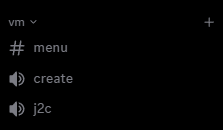
After running the above, your voice channels will look like this:
 You must create the additional voice channels with the `,voicemaster add (name)` command, and NOT manually.
You can then optionally set which category the voice channels should be created in
```bash Syntax theme={null}
,voicemaster category (vc id) (category id)
```
```bash Example theme={null}
,voicemaster category 1385285216268193884 1385285264402026506
```
Additional Misc Commands:
```bash Syntax theme={null}
,voicemaster list
,voicemaster remove (vc id)
```
```bash Example theme={null}
,voicemaster list
,voicemaster remove 1385285216268193884
```
You must create the additional voice channels with the `,voicemaster add (name)` command, and NOT manually.
You can then optionally set which category the voice channels should be created in
```bash Syntax theme={null}
,voicemaster category (vc id) (category id)
```
```bash Example theme={null}
,voicemaster category 1385285216268193884 1385285264402026506
```
Additional Misc Commands:
```bash Syntax theme={null}
,voicemaster list
,voicemaster remove (vc id)
```
```bash Example theme={null}
,voicemaster list
,voicemaster remove 1385285216268193884
```